Back to Nodes
P-Video Animate

P-Video Animate

Official

Animate a reference subject image using motion and optional audio from a source video.

Nodespell AI
AI / Video / Pruna Ai

Animate a reference subject image using motion and optional audio from a source video.

Use this when the motion performance matters and the target character or subject should come from a still image.

Model Examples (1)

Example Index01 / 01
Example 01

interrogation-performance-transfer

A published Seedance dialogue clip drives a new living portrait performance while preserving the target character's identity and framing.

Source Inputs02
Video
Example input
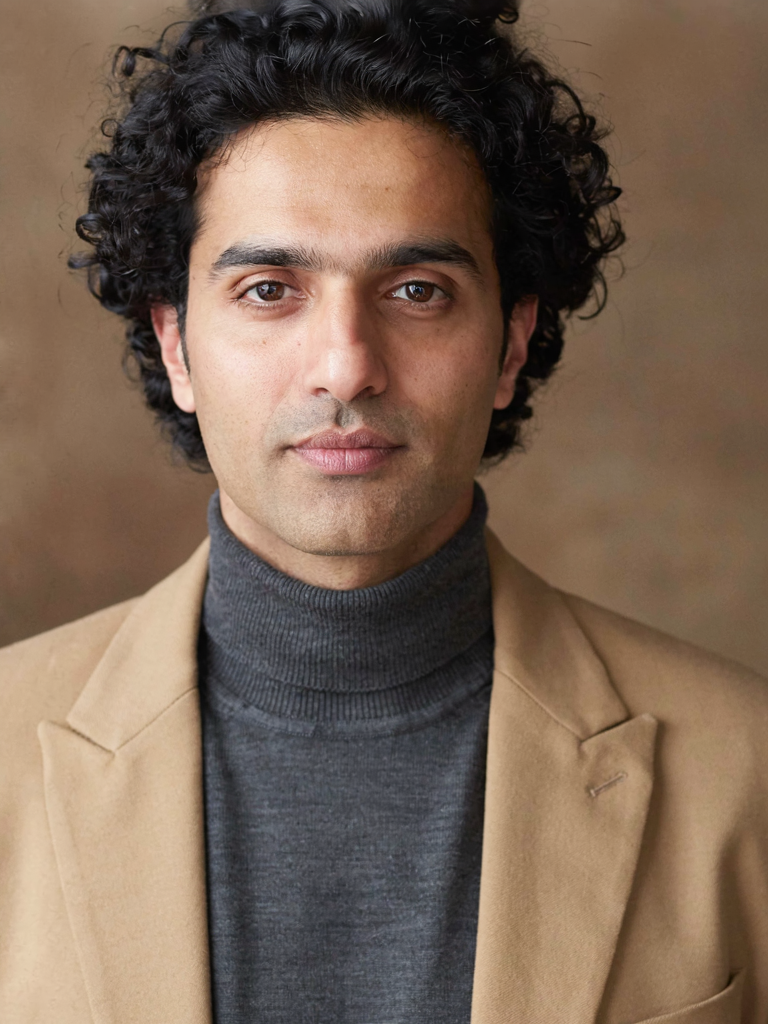
Image
Example input
Parameters06
Instruction Prompt
Transfer the close-up speaking performance from the source video into the man in the reference portrait while preserving his facial identity, curly hair, tan coat, charcoal turtleneck, and warm portrait background. Keep the performance intense but believable: the same eye-line tension, jaw clench, breath timing, subtle forward strain, and lip-sync timing from the source clip. Treat it like a living dramatic portrait rather than a new scene. Keep the audio from the source video synchronized and natural. No identity drift, no extra limbs, no background transformation, no camera motion, no rubbery mouth shapes, and no blinking glitches.
Resolution
720p
Target Fps
original
Save Audio
true
Ignore Audio
false
Turbo
false
motion-transferliving-portraitdialogueperformancesource-audio
Response
Inputs (2)

Motion Video

String

Source RGB video that provides motion and audio.

RequiredMin: 0Max: 100

Reference Image

String

Reference image of the subject to animate.

RequiredMin: 0Max: 100
Parameters (7)

Instruction

String

Further instructions for how the reference subject should be animated.

Default:

Resolution

String

Target output resolution.

Default: 720p

Target FPS

String

Target FPS for the working video.

Default: original

Save Audio

Boolean

Save the final video with audio.

Default: true

Ignore Audio

Boolean

Ignore source audio during generation.

Default: false

Turbo

Boolean

Faster generation with slightly lower quality.

Default: false

Seed

Number

Optional seed for repeatable generation. Set to -1 for a random seed.

Outputs (1)

Output

Inferred

Generated video output.

Nodespell Team

Creator profile

Type

Node

Status

Official

Package

Nodespell AI

Category

AI / Video / Pruna Ai

Input

ImageVideo

Output

Video

Keywords

Video GenerationMotion TransferConditional Generation
Use in Workflow