Back to Nodes
Qwen Image2 Pro

Qwen Image2 Pro

Official

Higher-control Qwen Image 2 for polished generation and editing.

Nodespell AI
AI / Image / Qwen

Higher-control Qwen Image 2 for polished generation and editing.

Qwen Image 2 Pro keeps the same core surface as Qwen Image 2 but is positioned for stronger realism, text rendering, and prompt adherence. It accepts prompt, optional image, negative prompt, seed, aspect ratio, prompt expansion, and match-input-image control.

Choose it when output quality is the main reason to use the Qwen Image 2 family.

Model Examples (5)

Example Index01 / 05
Example 01

Rooftop Herbal Clinic

Generates a grounded editorial scene with dense realistic detail.

Source Inputs02
Prompt

Realistic editorial still of a small rooftop herbal clinic at golden hour, glass jars of dried plants, handwritten-looking labels without readable words, doctor arranging tools, city gardens in the background, calm documentary composition.

Negative Prompt

watermark, logo, signature, extra readable text, distorted hands, low resolution

Parameters06
Aspect Ratio
16:9
Enable Prompt Expansion
true
Match Input Image
false
Negative Prompt
watermark, logo, signature, extra readable text, distorted hands, low resolution
Prompt
Realistic editorial still of a small rooftop herbal clinic at golden hour, glass jars of dried plants, handwritten-looking labels without readable words, doctor arranging tools, city gardens in the background, calm documentary composition.
Seed
-1
realismeditorialenvironment
Response
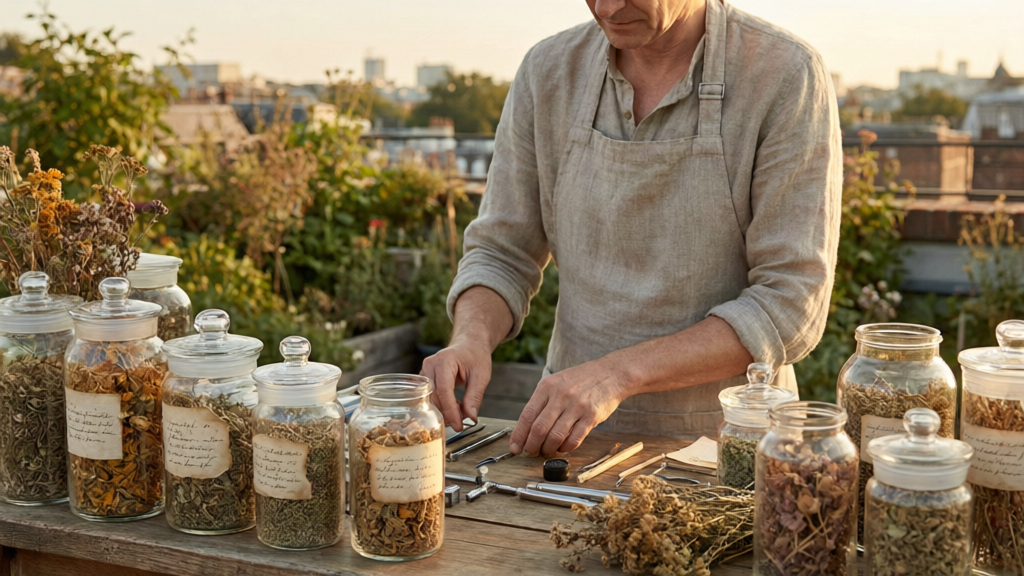
Rooftop Herbal Clinic output
Inputs (7)

Aspect Ratio

String

Aspect ratio of the generated image

Enable Prompt Expansion

Boolean

Automatically expand and optimize the prompt for better results

Image

String

Optional reference image for editing, style transfer, or image-to-image generation.

Match Input Image

Boolean

When true and an image is provided, use the input image's aspect ratio and resolution instead of the aspect_ratio parameter

Negative Prompt

String

Negative prompt to specify elements to avoid in the generated image

Multi InputMin: 0Max: 100

Prompt

String

Text prompt for image generation or editing.

RequiredMulti InputMin: 0Max: 100

Seed

Number

Random seed for reproducible generation. Range: 0-2147483647

Parameters (7)

Aspect Ratio

String

Aspect ratio of the generated image.

Default: 1:1

Enable Prompt Expansion

Boolean

Automatically expand and optimize the prompt for better results.

Default: true

Image

String

Optional reference image for image editing, style transfer, or image-to-image generation

Match Input Image

Boolean

When enabled with an input image, use the source image's aspect ratio and resolution instead of the aspect ratio setting.

Default: false

Negative Prompt

String

Negative prompt describing elements to avoid in the generated image.

Default:

Prompt

String

Text prompt for image generation or editing.

Required

Seed

Number

Random seed for reproducible generation. Use -1 for random behavior.

Outputs (1)

Output

Inferred

Output

Nodespell Team

Creator profile

Type

Node

Status

Official

Package

Nodespell AI

Category

AI / Image / Qwen

Output

Image
Use in Workflow